

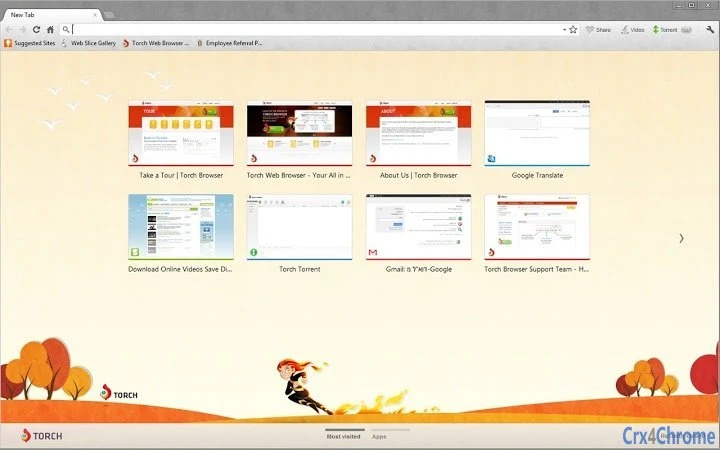
Description
Torch Browser: Fast, Secure Browsing with Built-in Downloads
Overview
Torch Browser is a desktop web browser designed to deliver a streamlined and feature-rich browsing experience. Built on the Chromium source code, it leverages the foundation of one of the most widely used browser engines, ensuring fast rendering, stable performance, and robust security protocols. The software aims to simplify web interaction by integrating essential tools directly into the browsing environment, particularly media downloading and content sharing.
Target users include casual internet explorers, media consumers, and individuals seeking a more personalized browsing experience without the need for third-party extensions. The browser is suitable for users who frequently download videos, music, or other online content and prefer a unified interface for both navigation and file management. Real-world usage scenarios include watching online videos and saving them locally, sharing links directly with friends via built-in tools, or customizing the interface with available themes for a more engaging session.
The developer, Torch, has positioned the browser as a user-focused alternative with an emphasis on convenience and customization. While specific details about the company’s background were not provided, the browser’s availability at torchbrowser.com suggests a dedicated online presence. The software is offered at no cost, making it accessible to a broad audience.
Key Features & Capabilities
- Chromium-Based Engine – Benefits from the speed, stability, and security of the Chromium platform, ensuring compatibility with modern web standards and reliable performance across diverse websites.
- Integrated Media Downloader – Allows users to download videos, audio, and other media directly from supported websites without requiring external tools or plugins.
- Built-In Sharing Tools – Enables quick sharing of links, pages, or media files through social platforms or messaging apps, reducing the need for copy-paste workflows.
- Customizable Themes – Offers users the ability to personalize the browser’s appearance with new themes, enhancing visual appeal and user engagement.
- Unified Interface – Combines browsing, downloading, and sharing in a single environment, reducing the need to switch between multiple applications.
These features are particularly useful for users who value efficiency and convenience. For example, a student researching online content can download educational videos directly from a lecture platform and share them with classmates in one step. Similarly, a content creator can save reference material and instantly distribute it via social media, all within the same interface.
User Interface, Workflow & Performance
The user interface of Torch Browser is structured to prioritize accessibility and ease of use. The layout follows a standard browser design with a clear address bar, tab management system, and navigation buttons, ensuring a familiar experience for users transitioning from other Chromium-based browsers.
Navigation is intuitive, with minimal learning curve, allowing users to open multiple tabs, switch between them, and manage downloads through a centralized panel. The workflow is optimized for users who frequently interact with media-rich content, as downloading and sharing functions are embedded within the main interface rather than requiring separate tools.
Performance details were not specified by the developer. However, since the browser is built on Chromium, it is expected to handle modern web applications and multimedia content efficiently. General software behavior patterns suggest responsive performance under typical usage conditions. The developer did not provide information on CPU or RAM usage, so specific resource consumption cannot be confirmed. Stability is assumed to be consistent with the Chromium base, though real-world observations are limited.
Compatibility & System Requirements
Torch Browser is available for both Windows and Mac operating systems, making it accessible to a wide range of desktop users. The software is designed to run on modern systems with standard hardware configurations, though exact system requirements were not listed by the developer.
Installation size is 25.7 MB, indicating a lightweight footprint that should not significantly impact disk space. This makes it suitable for users with limited storage or older devices. The version number is 2024.12.0, released on December 5, 2024, suggesting regular updates to maintain compatibility and security.
Compatibility information is limited to the operating systems mentioned. No details were provided regarding minimum processor speed, RAM requirements, or graphics capabilities. The developer did not specify whether the browser supports older versions of Windows or macOS, nor whether it is optimized for touch-based devices.
Pros and Cons
Pros
- Fast and stable browsing powered by Chromium engine
- Integrated media downloading without third-party tools
- Built-in sharing features streamline content distribution
- Customizable themes enhance personalization
- Free to download and use
Cons
- Exact system requirements not publicly listed
- No performance data provided for CPU or memory usage
- Limited information on update frequency or support lifecycle
- Developer background not detailed beyond the name
- Compatibility with older OS versions not confirmed
FAQ Section
Is Torch Browser compatible with Windows and Mac?
Yes, Torch Browser is available for both Windows and Mac operating systems. Specific version compatibility was not detailed.
Is the software safe to download and use?
Torch Browser is built on the Chromium codebase, which is known for its security features. However, users should always download from the official website to avoid potential risks.
Does Torch Browser require an internet connection?
Yes, the browser requires an active internet connection to access web content, download media, and use online sharing tools.
Can I use Torch Browser offline?
While the browser can be launched without an internet connection, most of its core features—such as browsing, downloading, and sharing—require online access.
Is there a license fee for using Torch Browser?
No, Torch Browser is offered for free. There are no subscription or licensing costs associated with its use.
Final Thoughts + CTA
Torch Browser stands out as a practical choice for users seeking a fast, secure, and feature-packed web experience with built-in media management. Its integration of downloading and sharing tools within a Chromium-powered framework provides a convenient workflow for everyday users and media enthusiasts alike. The ability to personalize the interface with themes adds a layer of user engagement that enhances overall satisfaction.
While some technical details remain unspecified, the browser’s lightweight size, cross-platform availability, and free access make it a compelling option for both casual and power users. For those who value efficiency and simplicity in their daily browsing, Torch Browser delivers a solid solution.
Download Torch Browser now to experience seamless browsing with integrated media tools and a customizable interface.
Guides & Tutorials for Torch Fields Theme for Chrome
How to install Torch Fields Theme for Chrome
- Click the Preview / Download button above.
- Once redirected, accept the terms and click Install.
- Wait for the Torch Fields Theme for Chrome download to finish on your device.
How to use Torch Fields Theme for Chrome
This software is primarily used for its core features described above. Open the app after installation to explore its capabilities.
User Reviews for Torch Fields Theme for Chrome 0
No reviews found





